Resources
Step 1 – Seed Keywords
Part of how search algorithms connect searchers with web pages that meet their needs is by matching the words on a web page (headings, content, alt tags, image names, etc.) with the search terms used by the searchers, as well as related terms.
The goal of keyword research is to identify the variations (seed keywords) of your main services that are most frequently searched ( highest search volume). This maximizes the number of searches that are matched to your website. Understanding your seed keywords can help give you a full perspective on your client’s industry, which is especially important when working in a new or unfamiliar niche.
Identifying Your Competitor(s)
First, identify your highest-ranking example (competitor) in the state or nationwide, (especially if you live in a smaller city) to understand how service pages are organized and identify “Seed Keywords”. Use the Actual name of the services to identify these seed keywords.
To do this, manually type your client’s services in Google Search in the locations near your client’s service area. Use a VPN to ensure you get the most relevant localized search results for each service and location. Identify the top-ranking competitor that best represent the majority of your new client’s service offerings within your target location.
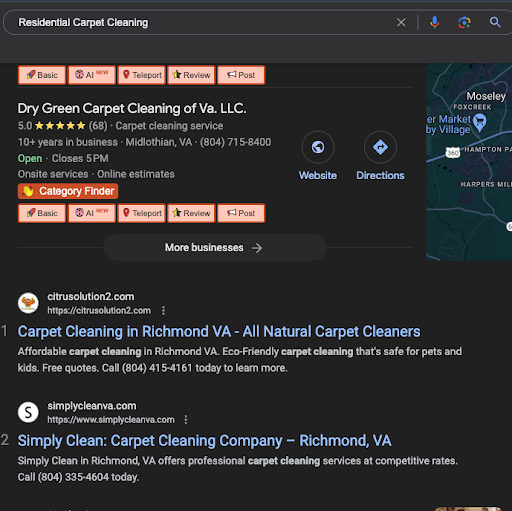
Use your client’s and competitor’s navigation to find potential seed keywords. Compare these keywords to the services offered by your client as well. In this example, let’s assume area rug cleaning is a service our client wants to offer.

Next, plug the keywords into Google Keyword Planner, focusing on keyword user intent and the services you’re trying to optimzie pages for. (This refers to understanding what users are looking for when they type in a set of keywords. For example, if someone searches for “area rug cleaning near me” they are looking for an area rug cleaning service, not information on how to clean it themselves.). Next, plug the keywords you identified into Google Keyword Planner, keeping in mind the importance of user intent. This refers to understanding what users are looking for when they type in a set of keywords. For example, if someone searches for “area rug cleaning near me” they are looking for an area rug cleaning service, not information on how to clean it themselves. By plugging in various options, you can gain a better understanding of the specific keywords that have the highest search volume.
In order to get results relevant to a specific geographic area, make sure to search in an account currently running ads and change your location to match the state as shown below. This can help with the differences in vernacular and verbiage in different locations of the country.
Search with AND without modifiers like “residential”, “commercial”, etc. to gain a full picture of the best seed keyword choice.
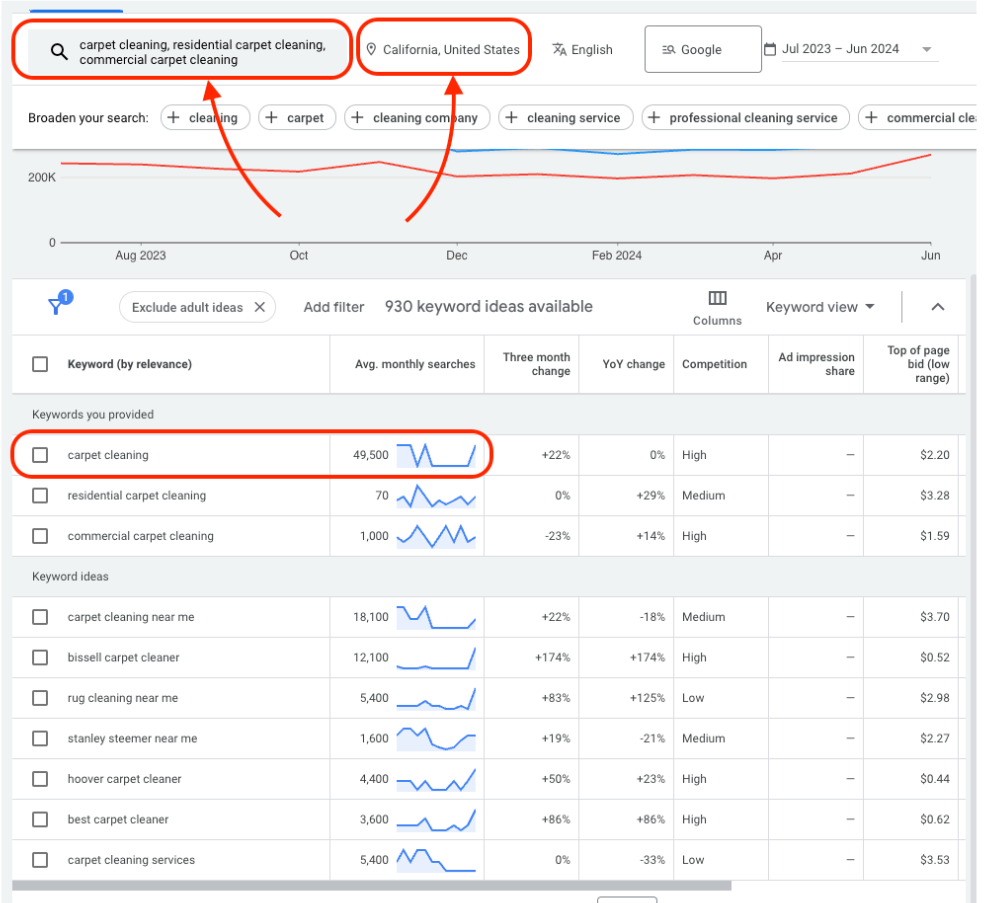
– carpet cleaning has the highest search volume in the result
Repeat this for each of the services your client offers to get a list of service “Seed Keywords” that you can use that have the highest search volume.
Step 2 – KW Brainstorming
Go to AM Entity Analyzer and enter your seed keywords along with your location modifiers (eg. “residential area rug cleaning, Commercial rug cleaning”) This helps identify keywords related to your seed keyword. Using the Keyword Tool on the salience page, review the AI-suggested related keywords (LSI). These are variations or related entities to the provided keyword that could enhance your keyword strategy. We recommend taking the top ~10 of these keywords. We will use these in the next step to identify overlap.
| LSI is the mathematical method used by search engines to understand the context and relationship between words and phrases in a piece of content. LSI keywords are words or phrases that are semantically related to the main keyword. For example, LSI keywords for area rug cleaning would be carpet cleaning, rug maintenance, professional cleaning, etc. Using multiple keywords within the same content makes it clear what a page is about. |
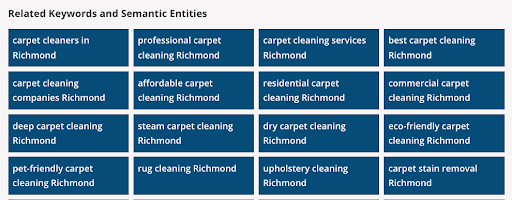
By organizing our keywords into seed keywords and then adding the secondary keywords, we now have a strong list that we can use to identify potential keywords to use in headings and in body content. Next, we need to confirm overlap using the list we just developed.

Step 3 – Selecting Optimal Keywords
We are now going to select our optimal keywords based on the traffic potential and make an educated decision to focus on the service + Location specifically. We will now select our optimal keywords by evaluating their traffic potential and relevance. By focusing on keywords that specifically combine the service with the location, we ensure the content attracts the most targeted and relevant traffic to the site.
Keyword Overlap Analysis
Google’s understanding of specific keywords is not always the same as ours as a searcher. This means, Google links related keywords and can show overlapping results in the SERPs.
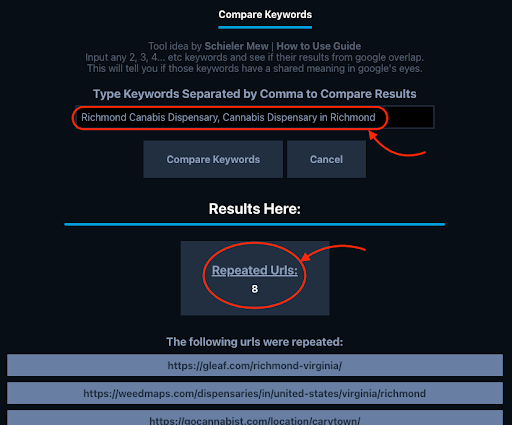
Our Goal – Create a Page Optimized for the HIGHEST search volume while also AVOIDING any KW overlap. We can test that using the tool below:
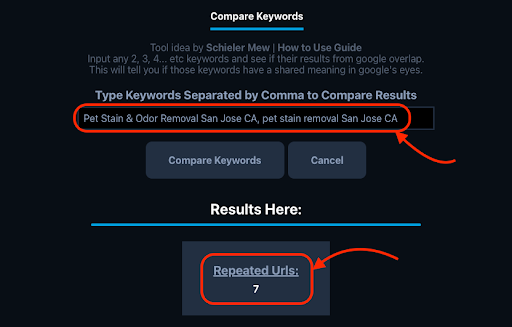
As you can see in the example image, the provided keywords have 7 repeated URLs in the search results (meaning 7 web pages were returned in the search results) – this signals a very strong overlap, and one of these keywords should be removed from your list (the one with lower search intent, volume, etc)
Now we will remove any of the irrelevant keywords from the groups we created earlier based on their association with a similar service. This alignment can be confirmed using the overlap tool and comparing the list of ~10 keywords that we set aside in the previous step – notice we are using location modifiers at this step now to compare overlap.
– Pet Stain & Odor Removal San Jose CA, pet stain removal San Jose CA
Checking Overlap on Main Services
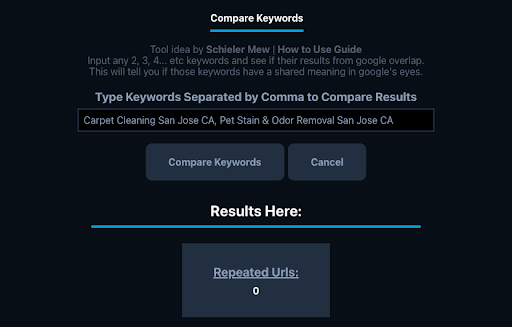
If the previous steps were completed successfully you should not have any overlap between your Service Seed Keywords. Now is a good time to check, however. When comparing your seed keywords with a city modifier you should have little to no overlap (under 3 URLs) ideally. Notice in this example there is zero overlap.
Semantic Keyword Clustering
As we narrow down our list of primary keywords to optimize each page, we will also keep track of related terms. These additional terms can help the page rank for multiple keywords, provide context, increase the potential for ranking for the primary focused keyword, and improve the overall search engine ranking.
After completing this process for all of your keywords you should have a list that looks like the following with a seed keyword (best fits your intent, search volume, etc.), followed by a list of other keywords that have similar overlap .In our example, we have replaced the location with a variable [city] as we plan to make pages for multiple cities:
– [city] Tile & Grout Cleaning, Tile Cleaning in [city], [city] + Grout Cleaning, Tile and grout cleaning company [city]
This should build the foundation for you to lay out your sitemap and menus for your website. Once you have confirmed your sitemap is properly created, you can begin to create the content using those keywords in the Headings, page content, image filenames, alt text, etc where it makes sense using the content creation guide below.
Selecting Your Locations
During your onboarding process with the client, you should have gathered a rough outline of the service area that your client wants to optimize for as well as the base location of their GMB (This will be your base city location).