Use this guide to optimize social profiles if your goal is to gain followers and subscribers to build a brand. As with all marketing, the ultimate goal is to drive some form of interaction via a CTA on all your social channels (Subscribe) in return for providing content they find engaging, interesting, entertaining, or informative.
1 Select a High-Quality Profile Photo
Use a recognizable personal photo instead of a logo that reflects your professional identity and personality. Ensure the image is high-quality and not pixelated, with appropriate sizing for desktop and mobile. If you want to remove the background you can use a free service such as pfpmaker.com
2 Utilize Your Name and Keywords
Creating an effective username is crucial for increasing the visibility and accessibility of your profile to potential followers and customers. Incorporate both your brand or personal name and relevant keywords into your handle to highlight your identity and expertise. This approach not only strengthens your brand presence but also facilitates memory recall and fosters a human connection with your audience.
By including specific keywords, you enhance your profile’s searchability, making it more likely to appear in search results for those terms. For example, if your username includes “fitness,” it will show up whenever someone searches for fitness-related content. To make these changes, simply go to the ‘edit profile’ or ‘username’ section of your platform. It’s important to keep your handle straightforward and reflective of your business focus to optimize search functions effectively.
3 Craft a Compelling Bio with Keywords
Having a good bio is probably THE MOST IMPORTANT PART of your profile. Without it, you’ll get tons of visits but no followers. Your bio needs to be tailored to the platform you’re optimizing for. Instagram tends to be 4 lines and often includes emojis, facebook tends to include less emojis and may swap them out for bullet points etc. Use this guide as a framework for your bio:
First, explain what you do and how you help. This is the first line they see, so make it clear what you’re about. For example, “I help home service contractors generate more leads.” Next, highlight why you’re different and why someone should follow you. With so many creators out there, you need to stand out. For instance, “By sharing proven marketing strategies for free.”
Then, build trust with a value statement. Mention a major accomplishment related to your niche to instantly gain credibility. An example could be, “Trusted by 200+ local businesses.” Finally, give them a clear call to action. At first, just ask them to follow you. Later, when you have a larger audience or a special offer, direct them to your link in bio.
It’s crucial that every CTA you make, whether in your bio or posts, is in the form of “Do ‘this’ to achieve ‘result’!” People are drawn to fulfilling their desires, so if you show them they’ll get what they want, they’ll be more likely to follow through. For example, “Follow me to skyrocket your business leads!” or “Tap the link in bio for a free marketing guide!”
4 Include a Clear Call to Action (CTA)
Direct users to your website or a single special offer by placing a link in your bio. Use a compelling CTA to encourage clicks, as we mentioned above! Do not place a ton of different links in your profiles stick to one main one aimed at promoting your offer or focused on growing your social channel.
Ex. – see the example below for all these best practices in action
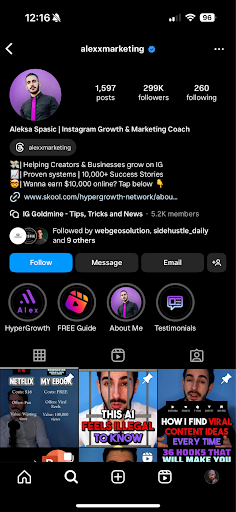
See the example above for the ideal use of Usernames, Name Fields, Bio, CTA, links, and highlights that we will cover in the next section. Use this same framework where applicable on all social channels to optimize them to increase follower count if your goal is to increase subscribers/followers and grow an audience.
5 Profile-Specific Features
Instagram
If using a business account, leverage features like business category, contact information, and action buttons. These features enhance your profile’s functionality and user interaction.
Instagram Highlights
Instagram Highlights can get you followers passively and, more importantly, drive sales or further interactions. So, they’re a must! Here are the main highlights you should consider using:
About Me
Keep it simple and clean. Make one or multiple slides where you Introduce yourself and share your past experiences. Consider highlighting your best achievements/projects and explain your motivation and what makes you unique. Describe how you help your followers/clients and then end with a call to action.
– “Follow me for [benefit]!”
Services / Products
List and explain your services here. Keep explanations short, or no one will read them. For each service, explain the service simply and professionally (Optionally, state a cost)
Add a CTA at the end. Use a link sticker with your CTA or tell them to DM you.
– DM me ‘SERVICE’ to achieve ‘RESULT’
Testimonials / Reviews
Share all your testimonials and add a CTA for each, promoting your top service or product. If you lack testimonials, reach out to people in your niche, offering free advice or small services in exchange. You can also do giveaways and ask for testimonials afterward. This can build credibility and trust.
Freebie
Offer something free in exchange for an email address to start building an email list as well. Clearly explain what you’re giving for free and why it’s useful. Send these people to an automated landing page/system to get the document in exchange for their email or do it manually if you prefer.
Highlight Covers
Use Canva or your design tool of choice to create simple symbols with your brand colors as highlight covers. This makes your profile look more professional and clean.
- Go to Canva and create a design for Instagram Story
- Choose a background (black, white, or your brand color)
- Search for a symbol that represents your highlight (e.g., “services”)
- Change the symbol’s color to match your brand
- Download, upload to your story, and choose it as the highlight cover
Contact Options
It’s harder for individuals and brands to reach you without a contact option.
It makes your “Follow” button smaller, reducing the likelihood of people following you. Add at least an email address in the “Contact options” under “Edit profile.”
Facebook
Ensure your business category is accurate, and utilize tabs and action buttons to facilitate bookings, orders, or inquiries directly from your page.
Leverage your Facebook Banner safe zones to share some type of offer like I did. You can download my Photoshop social media templates right here with the safe zones already established: